Audit Events
The Audit Events service provides a centralized audit trail for the Industrial Edge Management (IEM). It records security-relevant events — such as user logins, application installations, device operations, and configuration changes — to support security monitoring, compliance, and forensic analysis.
From the Audit events page under Settings, you can enable or disable the audit service, configure reserved storage size and retention period, and download audit logs as an archive.
For details on the audit log format, see Log Format. For Identity and Access Management (IAM) events, see IAM Events.
Permission
Only users with the admin role can access the Audit events page.
Download Audit Logs
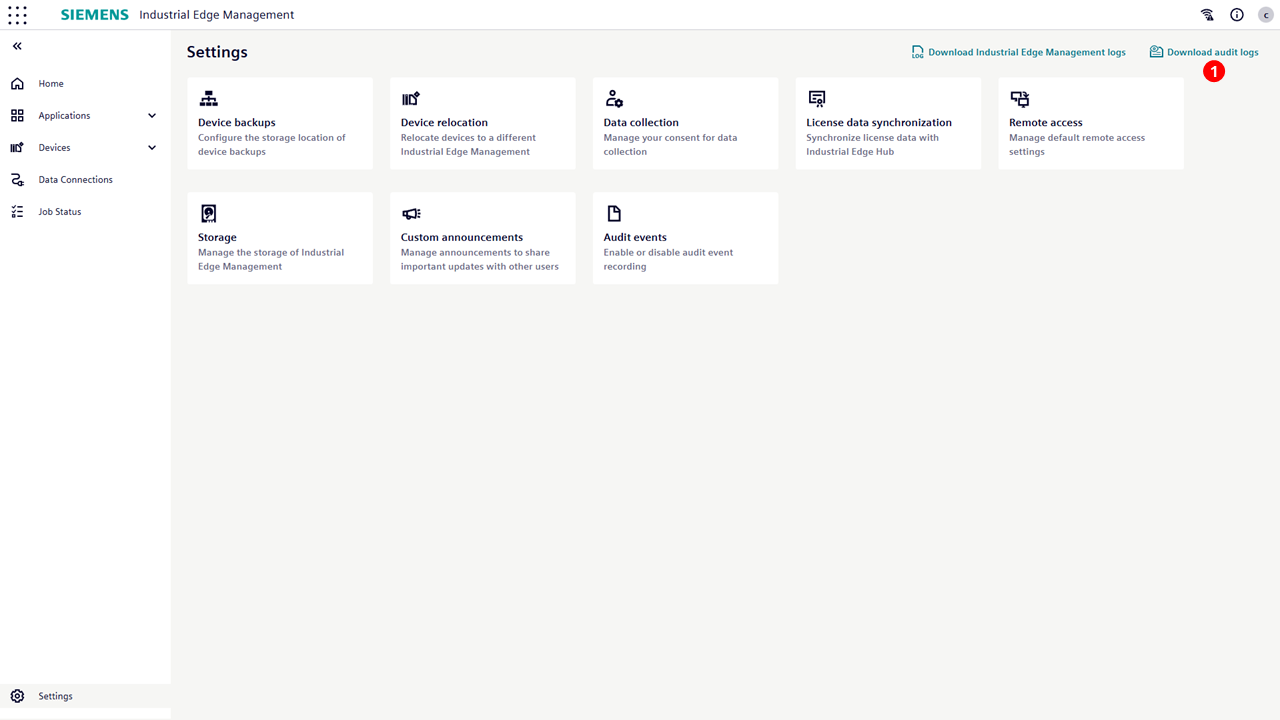
To download audit logs, navigate to the Settings page. The download button is located in the top-right corner.
| No. | Items |
|---|---|
| ① | Click to download the audit logs as a .tar.gz archive. The archive contains rotated and decompressed log files. |
The download button state changes dynamically depending on the audit service status and user permissions. The following table describes each scenario:
| Scenario | Button State | Tooltip |
|---|---|---|
| Audit Events service enabled, log files exist | Enabled | — |
| Audit Events service disabled, old log files still exist | Enabled | — |
| Audit Events service enabled, no log files available yet | Disabled | "No audit logs available for download" |
| Audit Events service disabled, no log files available | Disabled | "To carry out this task, you need to enable audit events" |
| User lacks required permissions | Disabled | "To carry out this task, you need more permissions. Contact admin to change permissions." |
| Service or database is unreachable | Disabled | "Unable to determine audit log status. Please try again later." |
Example of a downloaded .tar.gz archive file content:
- A rotated log file:
-
audit-2026_05_15_11_57_46_197.log -
Example audit event entry in this file:
{
  "apiVersion":1,
  "category":"audit log",
  "eventID":"iem.audit.enable.success",
  "message":"",
  "result":"success",
  "severity":5,
  "source":{
    "clientAddress":"158.226.192.212",
    "componentName":"audit-service",
    "instanceID":"my-iem-instance",
    "sessionID":"9uXnNbXhVL8Dhhwa-QbArooT",
    "userID":"590f8e2d-aca8-4850-b3c2-910acbe7675e"
  },
  "timestamp":"2026-05-15T08:57:09.461Z",
  "type":"SE_AUDIT_CFG_CHANGED"
}
Overview
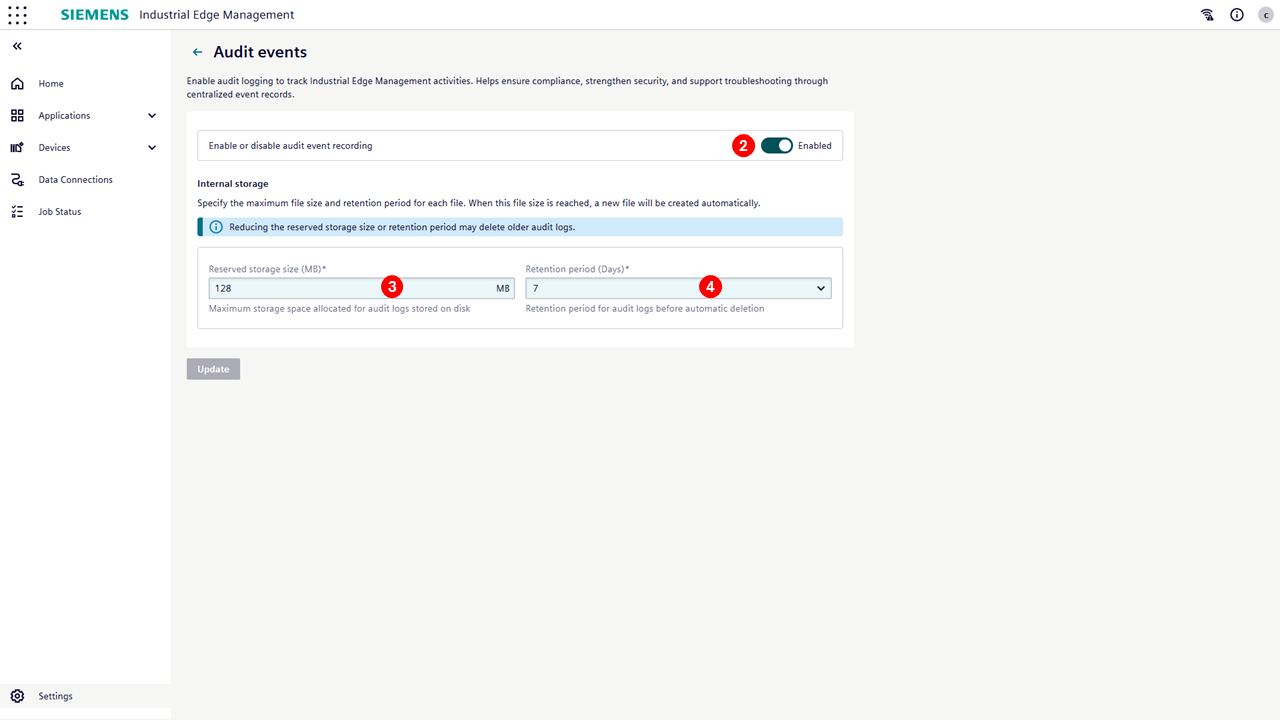
Below is an overview of the Audit Events UI, accessible under Settings > Audit events
| No. | Items |
|---|---|
| ② | Enable/disable audit service. If disabled, audit logs are no longer recorded.The default is enabled. |
| ③ | Set the maximum reserved storage size for audit logs (in MB). The allowed range is 32 MB (minimum) to 5120 MB (maximum), with a default of 128 MB. Audit logs are stored internally and the active log file (audit.log) is rotated when it reaches 8 MB in size or daily, whichever comes first. Rotated files are compressed using gzip. If the total storage usage exceeds the configured maximum, the oldest compressed logs are automatically deleted. |
| ④ | Set the retention period for audit logs (in days). The allowed range is 1 day (minimum) to 30 days (maximum), with a default of 7 days. Log files older than the configured retention period are automatically removed. Cleanup is triggered when either the maximum storage size or the retention period is reached, whichever comes first. |
Confirmation Dialog Popup
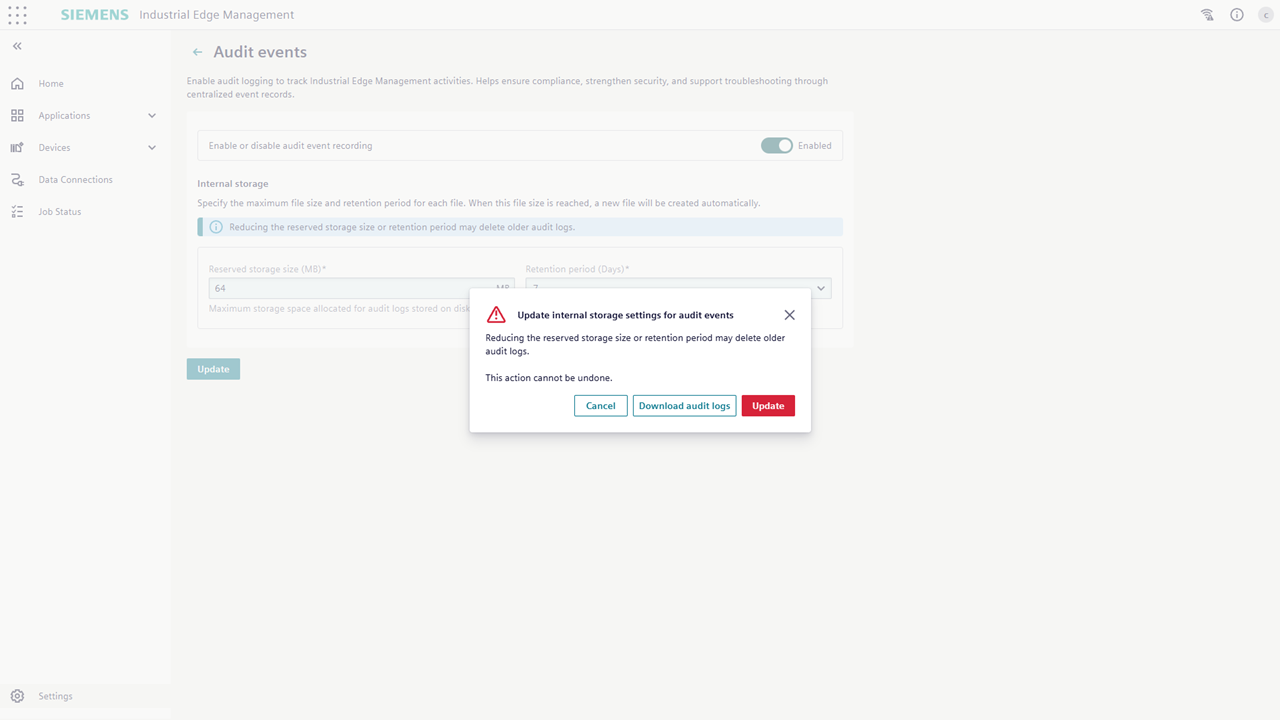
When reducing the Reserved storage size (MB) or Retention period (Days), a confirmation popup is displayed before applying the changes. This popup warns that older audit logs may be permanently deleted and the action cannot be undone. Users are given the option to download existing logs as a .tar.gz archive before proceeding or cancel the operation.
Audit Service Own Events
| eventID (Routing Key) | Security Event Type | Description |
|---|---|---|
iem.audit.enable.success |
SE_AUDIT_CFG_CHANGED | Audit service enabled. |
iem.audit.enable.failure |
SE_AUDIT_CFG_CHANGED | Enabling audit service failed. |
iem.audit.disable.success |
SE_AUDIT_CFG_CHANGED | Audit service disabled. |
iem.audit.disable.failure |
SE_AUDIT_CFG_CHANGED | Disabling audit service failed. |
iem.audit.configuration.update.success |
SE_AUDIT_CFG_CHANGED | Audit configuration updated. |
iem.audit.configuration.update.failure |
SE_AUDIT_CFG_CHANGED | Audit configuration update failed. |
iem.audit.logs.download.success |
SE_AUDIT_DATA_SAVED | Audit logs downloaded. |
iem.audit.logs.download.failure |
SE_AUDIT_DATA_SAVED | Audit logs download failed. |
iem.audit.api.access.failure |
SE_ACCESS_DENIED | Audit API non-privileged user access. |
Default Event Fallback
When an IEM component sends an audit event with an eventID that is not present in the predefined FCT list, the Audit Events service applies a default fallback mapping.
| Condition | eventID | Security Event Type |
|---|---|---|
Event with success or failure result |
iem.event.success / iem.event.failure |
SE_OBJECT_OPERATION |
| Event without a result suffix | iem.event |
SE_OBJECT_OPERATION |
This fallback ensures that unknown or unlisted events are still recorded and traceable.