Application Sharing
General
Application sharing allows you to share any application or a specific version with other users, while maintaining control over the actions each recipient can perform.
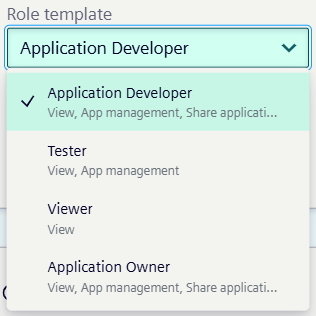
When sharing an application, you can select which actions (such as publishing or installing) are available to the recipient, based on the available role templates.
Access Requirements
To share an app, you must either be the owner of the app, have the Admin role of the ie-management client, or have the "Share" action plus at least one role template.
NOTICE
Sharing apps enables user enumeration, as you can only successfully share with existing email addresses. Attempting to share with a non-existent email address will fail, revealing whether a user exists in the system.
Sharing an Application
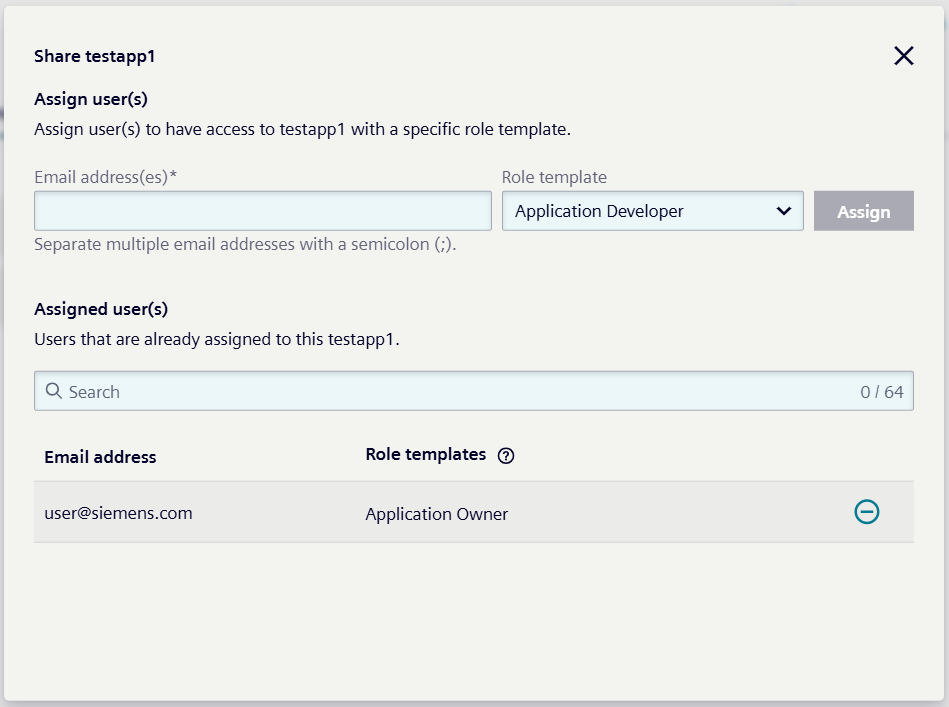
You can share any application from your device applications list with users registered in IAM. When you want to share an application, you simply select it from your Device Applications list and open its details page. From there, you can share the application by entering the recipient’s registered email address and choosing the appropriate role template to define their permissions. Once shared, the user appears in the list of assigned users with their assigned role, and you retain the ability to remove their access at any time.
Sharing a Specific Version
If you need to share a specific version of an application, you can navigate to the Version information tab within the application’s details page. By selecting Share version from the version’s action menu, you can assign permissions for that particular version to a user by entering their email address and selecting a role template. The user will then appear in the list of assigned users for that version, and you can unassign them whenever necessary.
NOTICE
You must share the application with the user before you can share a specific version.
NOTICE
Each user must be assigned at least the predefined User role of the ie-management client to ensure proper access to IEM.
IAM Role Creation on Sharing
Whenever you share an application or a specific version of an application, IAM automatically creates a corresponding role in the background.
These roles belong to the Auto Generated category and follow the naming convention:
ResourceShare_iem:<app_name>:<unique_id>
Auto Generated roles can be viewed in the Roles Overview but cannot be edited.