Hub identity
In the Hub identity page, you can check the hub name and creation date, as well as renaming the hub display name.
The following figure shows an example of the Hub identity page:
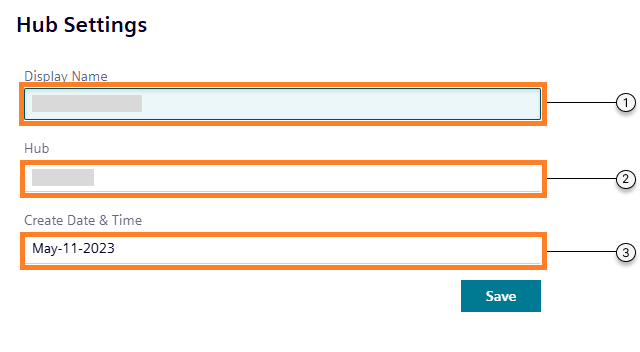
| ① | Hub display name |
| ② | Hub name |
| ③ | Creation date |
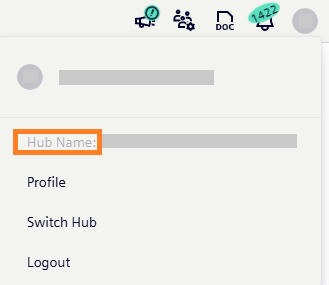
Hub name and display name are also displayed when you click the user icon:
Renaming hub display name
The hub name is generated automatically by the system without any meaning or semantics and cannot be changed. However, to clearly correlate hubs and to distinguish between several hubs, you can rename the hub display name. Via this display name, you can recognize hubs.
NOTICE
IE Hub URL
The IE Hub URL adapts to the generated hub name.
For example, when the hub name is core, the URL will be https://core.iehub.eu1.edge.siemens.cloud.
You can directly log into specific hubs by using the respective URL.
Procedure
-
In the
Display Nameinput field, enter the hub display name. The name must not contain a blank and must contain just alphanumeric characters. -
Click
Save.
The hub display name is renamed.