Publish Device Applications
This page guides you through the process of publishing Device Applications within the IEM. Publishing your application version makes it accessible to other IEM users for installation.
Overview
When you publish a Device Application, you are essentially making a specific version of your app available for wider use. Here are the key characteristics of a published application:
- One single public version: Within the IEM, only one version of a Device Application can be marked as "public".
- Visibility: Published versions become visible, installable, uninstallable, and updatable for all authorized IEM users.
- Update notification: The
Update Availablelabel that users see for their installed applications is directly tied to the currently published version. When a new version is published, users with a different installed version will be notified of the update.
NOTICE
Prerequisites To publish an application version the following prerequisites have to be fulfilled:
- Publishing permission: You must have the necessary permission assigned to your user account to publish applications.
- Hub apps: If your application was downloaded directly from the Industrial Edge Hub or uploaded via the IEM UI, it is typically considered directly published by default. This means you might not need to manually publish it through the steps below.
How to publish a Device Application
Publishing a Device Application is a straightforward process within the IEM UI.
- Navigate to your Device Applications
- Select the application
- Access the
Version informationtab - Choose the version to publish
- Initiate publishing
- Confirmation
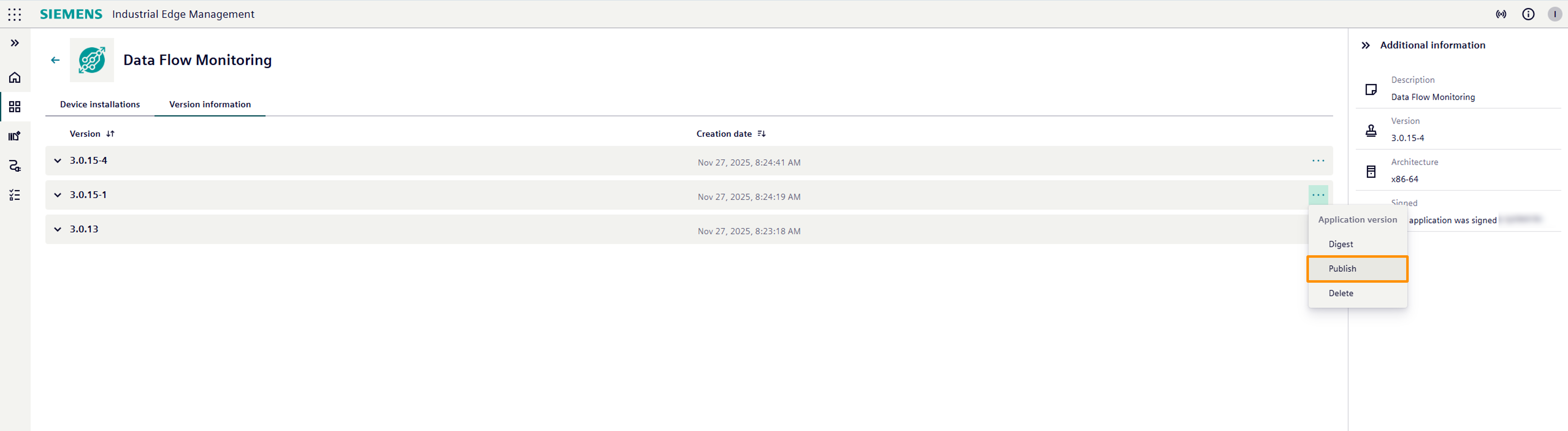
Once confirmed, this version will now be marked as public and will be discoverable by other IEM users. Any previously published version of this application will automatically be unpublished, ensuring only one public version exists at a time.
How to unpublish a Device Application
While only one version can be public at a time, you might want to explicitly unpublish an application version (e.g., if you need to temporarily remove it from public view or replace it with a new public version).
The process for unpublishing is typically done through the same UI function as publishing:
- Follow steps 1-4 from the "How to Publish a Device Application" section above to navigate to the version information of your application.
- If a version is currently published, you will usually find an option within its context menu to "Unpublish".
- Click this option and confirm the warning message.
This action will remove the selected version from public visibility, meaning it will no longer be available for new installations by other IEM users.