Device details
On the device details page, you can find device-related information and actions.
Besides basic device information, for example name, device type, and architecture, the page includes the following components:
- Labels
- Installed applications
- System metrics
- Firmware
- Log files
- Commands
- Settings
- Remote Access
- Additional information
NOTICE
For devices that are not onboarded yet, you can download the configuration file.
Labels
With the Labels feature, you can categorize and organize devices by assigning custom labels. You can add or remove labels as needed. Labels are displayed on the device overview page in both card and list views. This gives you a quick visual reference for each device.

System metrics
The system metrics show the device consumption for Memory, CPU, and Storage. This helps you identify the current resource utilization of the device.
Gauge indicators
The color of the gauge is based on the threshold point set on the device.
- Green: Indicates that the average or peak is within the normal range.
- Yellow: Indicates that the average or peak has reached a warning level.
- Red: Indicates that the average or peak has reached a critical level.
Log files
In the log files tab, the created device logs are displayed and can be downloaded. You can enable or disable log streaming in the device settings.
Settings
Clicking on Settings opens the device-specific settings that you can edit:
- Memory limit check
- Logs
- Certificate
- Streaming logs
- Device reset & removal
For more information about Memory limit check, Certificate, and Streaming logs, see the detailed settings chapters below.
Additional information
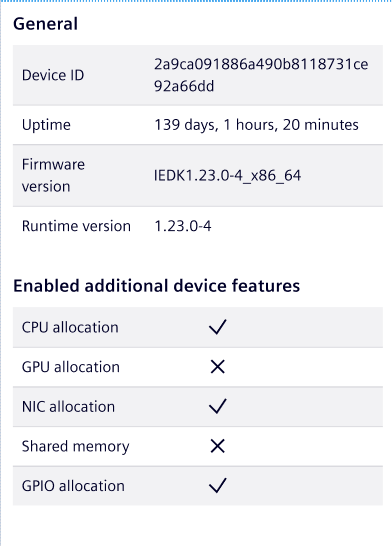
This section displays additional information such as the device ID, uptime, firmware version, and runtime version. You can also identify which additional device features are enabled or disabled:
- CPU allocation indicates that the
cpu-resource-pluginhas been enabled or disabled on the device. - GPU allocation indicates that the
gpu-resource-pluginhas been enabled or disabled on the device. - NIC allocation indicates that the
network-resource-pluginhas been enabled or disabled on the device. - Shared memory indicates that the
shared-memory-pluginhas been enabled or disabled on the device.