Onboarding with a Cellular Module
Overview
The following section explains how to onboard an Industrial Edge device with a cellular module using onboarding JSON that includes the required cellular configuration. It also lists the applicable IEDK and IEM compatibility requirements.
Procedure
- You can generate the onboarding JSON for a cellular-enabled device type in IE Management using one of the following approaches:
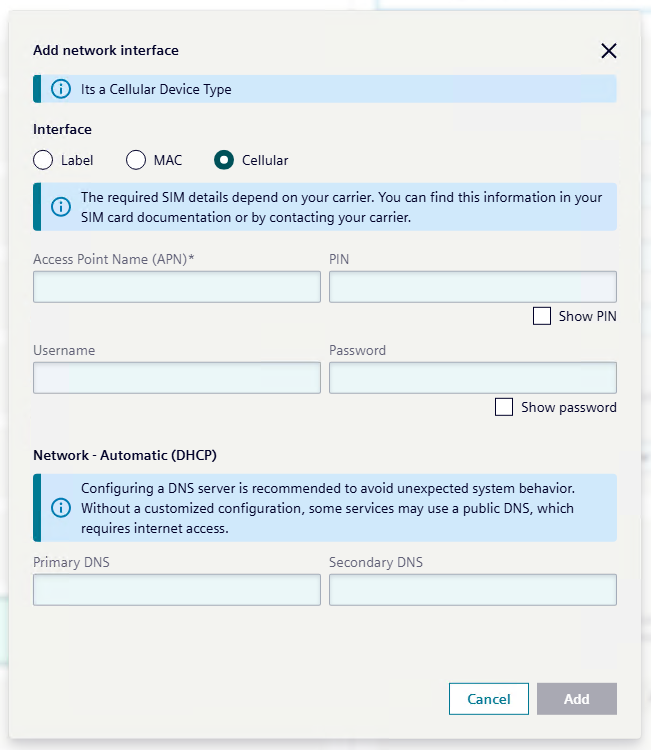
- UI: Add a Cellular network interface.
- API:
https://XXXX/p.service/api/v4/devices/create(IEM V1 only)
- UI: Add a Cellular network interface.
- Provide the required cellular module settings in the selected approach (UI or API request payload): APN (Access Point Name), PIN, username, and password. Note: Only APN is mandatory.
- The generated onboarding JSON includes a network interface entry like this:
{
  "Device": {
      "Network": {
          "Interfaces": [
              {
                  "GatewayInterface": true,
                  "DHCP": "enabled",
                  "Static": {
                      "IPv4": "",
                      "NetMask": "",
                      "Gateway": ""
                  },
                  "GsmConfiguration": {
                      "Apn": "apn",
                      "Username": "testuser",
                      "Password": "Test123",
                      "Pin": "123456"
                  }
              }
          ]
      }
  },
  ...
}
Insert the USB drive containing the onboarding JSON into the edge device's USB port to start onboarding (see: Onboarding via USB flash drive).
Compatibility Requirements
- Support for cellular network connectivity is available starting with IEDK v1.28.0.
- For edge devices running IEDK v1.28.0, USB onboarding is the only supported method to configure a cellular module connected to an edge device.
- IEM Pro v1.15.16 or later is required to generate onboarding JSON with the required cellular module configuration to onboard edge devices with cellular modules.
- Any combination in which either component is below these minimum versions is not compatible.
Security Considerations
APN Behavior
During GSM module configuration, some mobile network providers may automatically provision or modify the Access Point Name (APN). Because of this, a device may establish a data connection even if the configured APN is incorrect or not specified. This behavior depends on the mobile network operator, the SIM card, and the geographic region. Connection behavior and APN validation therefore vary between providers.
Public IP Address Assignment
Some SIM cards may assign a public IP address to the device. When this occurs, the device becomes directly accessible from the internet. This exposure may increase the risk of unauthorized access attempts or other cyber threats.
Security Recommendations
Users should verify the network characteristics of their mobile service provider. If the SIM card provides a public IP address, it is strongly recommended to implement appropriate security measures, such as:
- configuring a firewall
- restricting network access
- filtering unnecessary ports
The user is responsible for ensuring the overall network security of the device.