Setting up IE Connectors
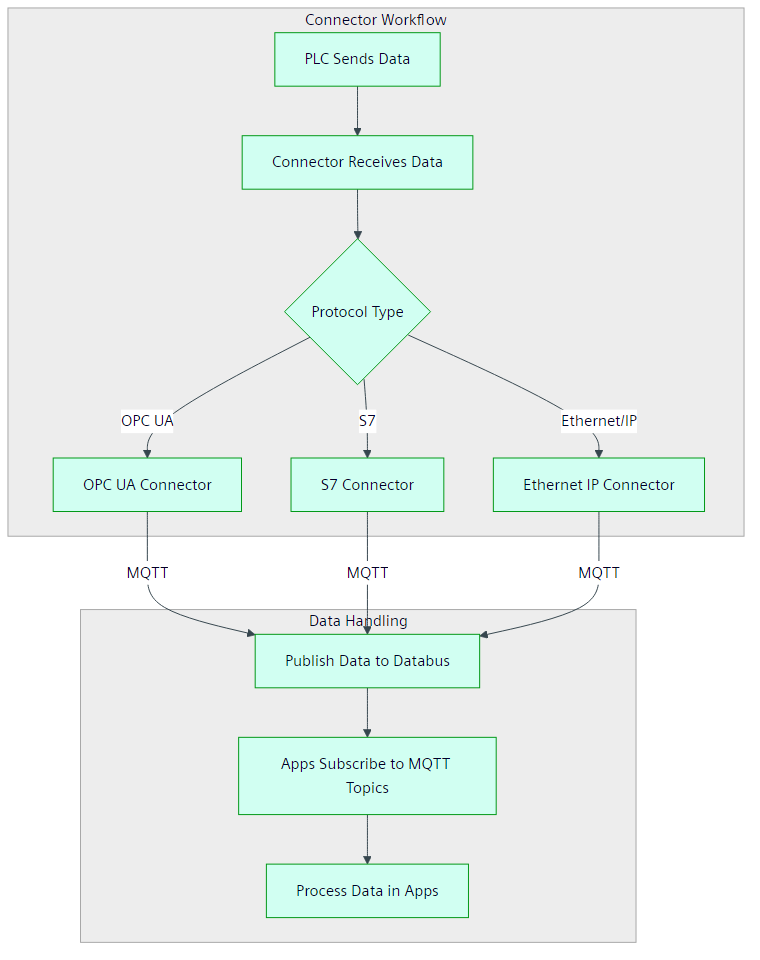
Connectors are apps running on Industrial Edge Devices (IE Devices) that translate data between PLCs and Edge Apps. They convert various industrial protocols such as OPC UA, Ethernet IP, or S7 into the standardized MQTT protocol.
- Connectors enable seamless communication between PLCs from different manufacturers and Edge Apps, reducing integration complexity.
- Connectors simplify app development by requiring developers to support only MQTT protocol integration.
When deployed, connectors automatically handle the protocol conversion process:
- Receive data from PLCs in their native protocols.
- Transform data into MQTT format.
- Publish the converted data to an MQTT broker (Databus) on the IE Device.
- IE Apps on the IE Device can subscribe to relevant MQTT topics and process the data.
Choosing your connector
These tutorials will look at the process of configuring the following connectors:
- OPC UA Connector
- Ethernet IP Connector
- S7 Connector
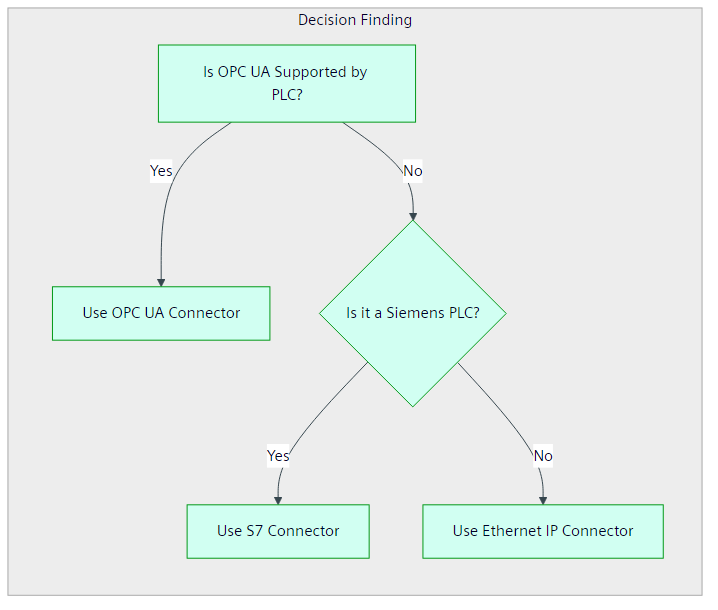
Choose a connector based on your device type and company preferences. All connectors deliver the same result on Industrial Edge. Use the flowchart below for guidance:
The different connectors also have different limitations regarding how many tags can be configured. Refer to their documentation for more information:
Recommended connector for multiple protocols or standards
Siemens recommends using OPC UA Connector for IE devices that require multiple protocols or standards due to its platform independence, robust security features, and scalability. OPC UA Connector supports seamless integration across diverse systems, making it ideal for modern industrial environments. However, using OPC UA Connector may result in higher data traffic.
Connectors provided with Industrial Edge Management
Always refer to the official connector documentation for supported devices.
Industrial Edge Management contains the following connectors free of charge:
| Protocol | Connector application | Supported devices and documentation |
|---|---|---|
| OPC UA | OPC UA Connector | |
| S7 | S7 Connector |
Other compatible Connectivity Suite connectors
Always refer to the official connector documentation for supported devices.
Industrial Edge Management does not contain the following Connectivity Suite connectors, which are available for purchase in the Marketplace for an additional cost:
Connecting a PLC using a Siemens connector
- To connect a device using OPC UA, proceed to Connecting a PLC using OPC UA Connector.
- To connect a device using Ethernet IP, proceed to Connecting a PLC using Ethernet IP Connector.
- To connect a device using S7, proceed to Connecting a PLC using S7 Connector.
- To connect a device using another Siemens connector, follow the installation steps for the specific Siemens connector. The documentation for each connector is listed in the table above under Other compatible Connectivity Suite connectors.