Setting up IE Management overview
Industrial Edge Management (IEM) serves as the central infrastructure for Industrial Edge. IEM is the control plane from which the user manages devices, apps, and users of a shopfloor.
Choosing your Industrial Edge Management offering
Siemens Industrial Edge offers three IEM offerings:
- IEM Cloud: A Siemens-managed solution for quick application deployment
- IEM Virtual: Deployable as a virtual machine in your infrastructure
- IEM Pro: A fully self-contained, highly customizable setup
Consider your specific requirements for customization, deployment ease, and management preferences. Use this table as an overview of the features and use cases of each IEM offering and see which offering is most suitable for you.
| Offering | Features | Use cases | Licenses |
|---|---|---|---|
| IEM Cloud | Managed solution: Siemens manages the Kubernetes infrastructure, allowing you to focus on operations efficiently without needing to manage the underlying systems. Quick Start: Enables rapid deployment and operation with minimal setup effort from the user. |
Ideal for users who prefer an out-of-the-box solution with Siemens handling the infrastructure, ensuring seamless app execution. | IEM Cloud license purchased from the Marketplace. |
| IEM Virtual | Ease of deployment: Designed for easy deployment as a virtual machine using ESXi, Hyper-V, or VMware Workstation. This option is convenient for users wanting a straightforward, locally hosted solution. Versatility: Can be used for initial lab testing and production scenarios, offering flexibility in how you manage your IE Devices. |
Best for scenarios prioritizing local data processing, sovereignty, or specific compliance needs. | No license required. |
| IEM Pro | Customization & independence: Offers a highly customizable setup, allowing you to tailor configurations both in the cloud and locally. Ideal for users seeking complete control over their Edge infrastructure. | Suitable for complex environments requiring detailed configurations and extensive management capabilities. | No license required. |
Browser compatibility
Industrial Edge Management is optimized for modern web browsers. Industrial Edge Management supports the latest stable version and one previous version of the following browsers:
- Google Chrome
- Mozilla Firefox
- Microsoft Edge
NOTICE
For best performance and security, Siemens recommends using the latest stable version of any supported browser.
Theoretical Foundations
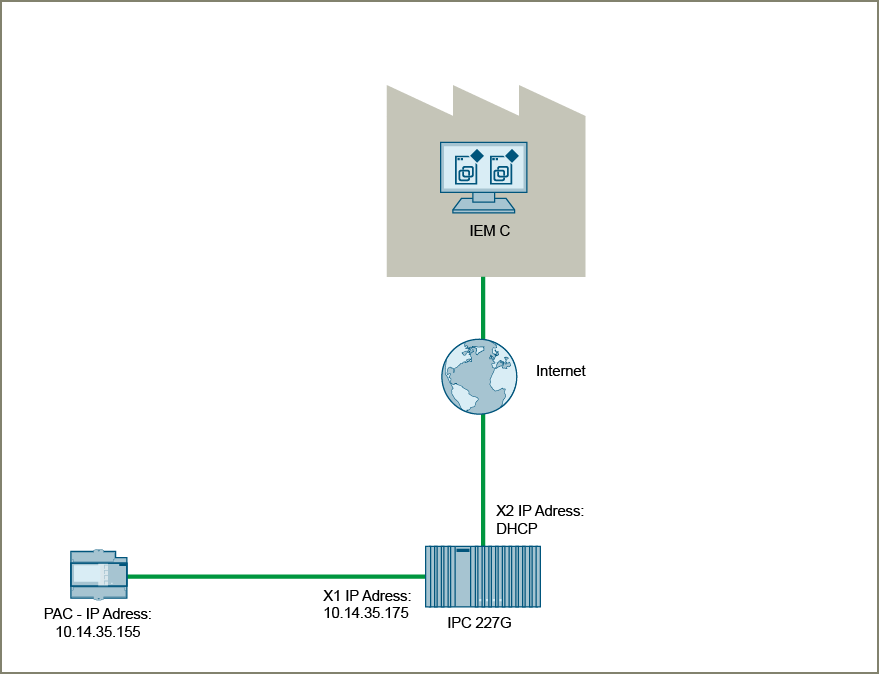
Refer to the figure below, which illustrates the Internet-based connection from the IEM to the IE Device. Communication between the IE Device and the PLC occurs over a local and protected network.
Setting up Industrial Edge Management
To set up Industrial Edge Management:
- For IEM Cloud, proceed to Setting up Industrial Edge Management Cloud.
- For IEM Virtual, proceed to Setting up Industrial Edge Management Virtual.
- For IEM Pro, refer to the IEM Pro documentation before proceeding to Getting Started with IE Devices.